
Summer’s come to an end and it’s time again to pick up indoor activities – like exploring the world of computer programming with C++.
My previous and very first post was about investigating what a modern computer can do, using Eratosthenes’ Sieve as an example that stretched the PC to its limits using single thread programming.
Using a naive approach, I was stumped by reality: even if it seemed my program could handle the request to count the number of primes up to 1011, it took more than a night of computing, and I stopped the program before it had returned a result.
Here is a diagram of the simple sieve algorithm, using one big chunk of memory for the whole sieve:
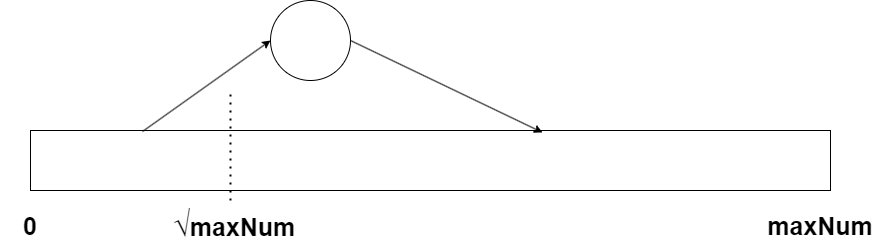
The algorithm is taking new primes, working from 2 and up, to punch out holes in the sieve, but for a given maximum number to check, it will never have to go higher than the square root of the maximum number, as explained in the previous post.
Trouble hit, when the total sieve in one chunk was bigger than the (available) physical RAM, as this would start generating page faults all the time, forcing data having to be moved between RAM and the page file on the hard disk all the time, a phenomenon called threshing.
The idea is to split the sieve up in several smaller chunks, that can each be within the available physical RAM, so we don’t overcommit the amount of physical RAM. Since we only will need up to the square root of maxNum for any part of the sieve, we will generate that first and keep it, and then take the rest of the number range up in smaller chunks separately.
This can be illustrated like this:
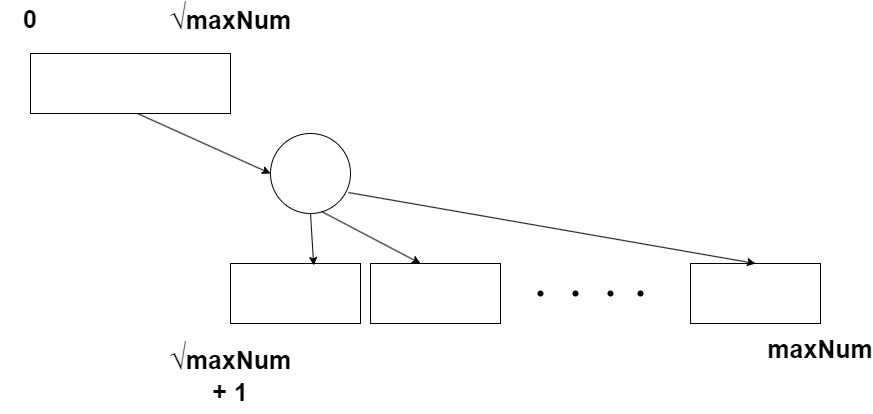
For each chunk of the higher part of the sieve, we will punch out all multiples of the necessary primes, which we can find in the primary sieve, then count the primes found in this chunk, clean it up and go on with the next chunk, all the way up to the maximum number we want to investigate.
With this approach we actually also have a way to utilize all the cores of the CPU that were just standing there, doing nothing. We could give them each a chunk to work on, pulling the necessary primes from the same initial prime sieve. This would only need to be available in one copy for all the cores to use.
This could look like this:

Of course, we still have to take care that we are not overcomitting the physical RAM when all of these cores are working along each other. This could be solved by having each core take several chunks, one after the other, in the same way as when we are using just one core as on the previous diagram, combining the 2 principles: dividing work in smaller independent parcels to be executed one after the other and giving the parcels to several workers working in parallel.
How can we make our program do that? Operating Systems will typically offer the concept of a thread, presenting a thread of execution, which the OS will make sure will be running on a core, interleaved with other threads or, if available on its own core, as long as it has anything to do. Programming Languages and their libraries will typically also have a concept of a thread, which of course will be implemented with the threads of the OS.
So with C++ and it’s library <thread> I could setup as many threads as I wanted, giving them some code to run, to do some work for my prime sieves. I would need to organize the code of the threads, so when they have finished one chunk, it should get a new one, and there should be a way to let the results – the number of primes in each chunk – flow to the main thread of the program.
This interthread communication would need to take into account that the individual chunks will have different execution times (remember – the square root of the highest number in the chunk will determine how long the chunk should be processed) and I would have to make sure that they don’t work on the same chunk, wait for them to have a result and then get it, etc. It could become a bit complicated.
The modern way of using multithreading is to lift the design up to an abstraction level where you think about units of work that could be done in parallel, and then let some general mechanism distribute these units of work to threads and cores. Typically they are called tasks, and there are ways to check if a task has finished and get the output – if needed.
I have chosen to use the Microsoft Concurrency Runtime1, rather than the standard C++ threads library. That’s because it offers utilities to make it easier for several tasks to communicate and to orchestrate their execution. I am using an even more abstract concept, an agent, which is an object with task characteristics, with a few more possibilities of control: It can be started at will and can contain data like an object, instead of just a function which is the normal foundation of a task.
The design can be drawn like this:
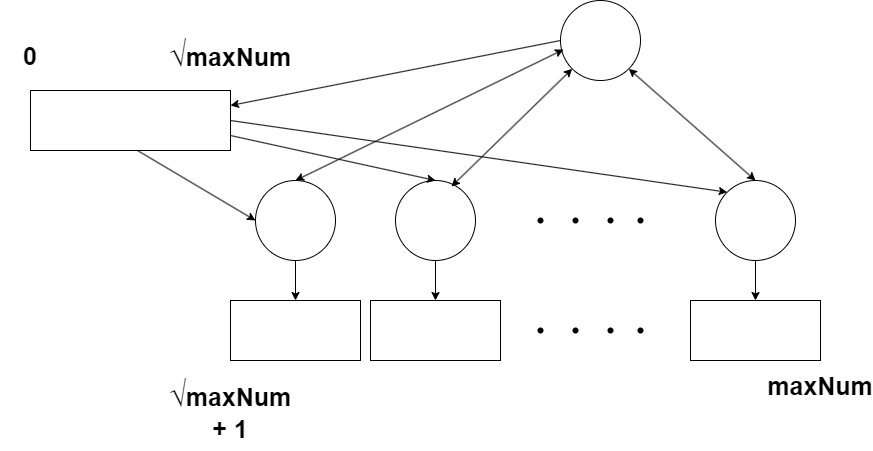
I have now added a starter task (agent) that will first generate all the primes up to square root of maxNum, then orchestrate several tasks, to work on each its own chunk of the total sieve. It will make sure that at most the desired number of tasks are active in parallel, using at most the desired amount of physical RAM. It will make a new task when one is finished, as long as there are still uncovered parts of the total sieve. For each finished task, it will obtain the number of primes it found in its assigned chunk of the sieve and sum them up.
To control the program I therefore add 3 new command line arguments:
“–sieves” to control the number of parallel tasks working on the sieve, and
“–memory” to control how much physical RAM they will use together. I also add a an argument
“–logfile” which will be the name of a text file where the program will store the results of the run, including the elapsed time.
So a run of the program could look like this on the command line:
PrimeSieveParallel.exe --prime 10e9 --memory 20e9 --sieves 1
And this could give the output:
Specified parallel sieves: 1
Specified max memory: 20,000,000,000
Searching for primes up to 10,000,000,000
Initial sieve size: 100,000
Initial sieve seeding prime size: 316
Initial sieve number of primes: 9,592
Range for each sieve: 9,999,900,000
Using 1 sieves
455,052,511 primes
Total time: 74.844 seconds
As you can see, we get the same result as the simple algorithm from the last post. For this run I chose to run only 1 sieve thread and got an execution time of 74.8 seconds instead of 71.8, so there is some overhead, organizing the algorithm this way. But this should give us some advantages, so lets try with 1011 (the command line arguments can be abbreviated):
PrimeSieveParallel.exe -p 1e11 -m 20e9 -s 1
This gives the result:
4,118,054,813 primes
Total time: 866.222 seconds
which is correct according to this table from WikiPedia. So our program finished within a finite time, even if we only used 1 thread for the sieve. We have overcome the obstacle of the number of page faults exploding (threshing), as can be seen on this snippet from the Task Manager. The number of threads for our program does say that it is using 5 threads, but the Concurrency Runtime and the starter task are also using threads. We are only using one core fully – using 3% of the total computing power of the PC.

The algorithm had to be changed slightly now that each sieve task is only looking at a part of the total sieve, and is getting the primes to use for punching from a common list. Here is the code so you can compare to the code from the previous post:
	void run()
	{
		itype rangeSize = endRange - startRange + 1; // Include both ends
		numbers = new char[rangeSize] { 0 };

		itype sqrtEnd = sqrt((long double)endRange);
		itype p = 2;
		itype pindex = 0;

		while (p <= sqrtEnd)
		{
			itype i;

			if (p * p >= startRange)
				i = p * p - startRange;
			else
			{
				itype offset = (startRange % p);
				i = (offset == 0 && p != startRange) ? 0 : (p - offset);
			}

			for (; i < rangeSize; i += p)
			{
				numbers[i] = 1;
			}

			pindex++;
			p = (pindex < numInitPrimes) ? initPrimes[pindex] : sqrtEnd + 1;
		}

		// Count my primes
		for (itype i = 0; i < rangeSize; i++)
		{
			if (numbers[i] == 0)
			{
				primeCount++;
			}
		}

		done();

		asend(resultChannel, this);
	};
};
In lines 3-4 I allocate the sieve data for the appointed range of the sieve for this task. Line 6 determines the square root of the last number in the range, as this will be the highest prime to consider for this range. The while loop starting at line 10 will use all the relevant primes to punch out holes in this range. In lines 14-20 we are determining where to start for a given prime p. As in the primitive version, we can start with p*p as all smaller multiples of p have already been punched out. But if the whole range is already larger than p*p, we have to synchronize the hole punching according to where the range is situated relative to the list of holes to be punched for p, so in lines 18-19 we use the modulo operator – % – to find the offset so we can start with a multiple of p. In lines 22-25 we punch the holes for p in this range. The next prime is found in a list, prepared by the starter task, so we don’t have to skip holes in the initial sieve, we can just take the next prime in the list. When the next prime is larger than the square root the last number in the range, we can stop (line 10).
Then the primes in this range can be counted, as the numbers that have not been punched out – lines 32-38. Line 40 is a call to the concurrency library that this task (agent) is done, and line 42 will signal this to the starter task, by sending a pointer to this sieve itself.
The starter task will then use this pointer to collect the number of primes in this range, clean it up and arrange for a new range to be processed.
The reason for me to take this journey to parallelize Eratosthenes’ Sieve was to see if I could get all the cores of the CPU in my PC to speed this up. To gather some data, I also wrote a program, RunPrimeSieveParallel, that will run PrimeSieveParallel with a selection of parameters: the maximum number, the amount of memory to use and the number of parallel sieves. The code for all this is organized as two Visual Studio projects in a Visual Studio solution on github, and it can be found here.
So with these tools in place, I ran a timing for counting the primes up to 1010 telling the program to use from 1 to 32 parallel sieves. Here are the timing as a graph:
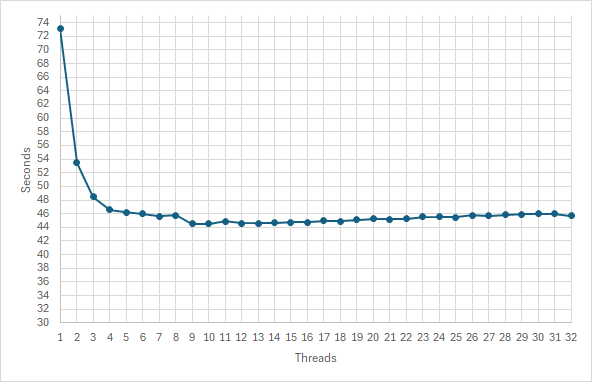
Was I disappointed? Yes! Going from 1 to 2 threads gave the timing going from 73 s to 53 s. That seems substantial, but not halving the time as I and maybe you expected. There is some overhead from the non parallel parts of the program. Next step went to 48 s, but then the results levelled out at 44 s from using 9 threads, without any improvement – rather the opposite – up to 32 threads. 🙁
I checked – its not a matter of page faults, I had made sure that the physical memory would not be overcommitted, and the Task Manager confirmed that.
OK! Maybe I stretched the description in my previous post of my PC a little – it doesn’t actually contain the equivalent of 32 computers. First of all, all these logical cores share som hardware 2 and 2 as hyper-threading is not really 2 cores, but 1 core capable of making it look like 2. And all 16 physical cores share the same RAM connection of which there is ONE, so when all of them are running, they compete for the RAM Bus to get instructions and data. No wonder I don’t get a 32 times speed up.
So after this somewhat disappointing result after all this work on my super computer I played around a bit with the command line arguments. One line of investigation was to see what would happen if I restricted the amount of RAM to use, surely the overhead of having to cover the whole sieve in many smaller chunks would make the timing worse.
The sweet spot seemed to be using 10 threads, so I made some measurements using that. For maxNum 1010, allowing use of all free RAM , the total sieve was covered with 10 small sieves, one for each thread, it took about 44.5 s. Allowing less RAM would mean the sieves would be smaller, and there should be more overhead, so surely this should take longer. I tried with allowing usage of 109 bytes of RAM (about 1GiB2 of RAM). This resulted in 101 small sieves finding the correct number of primes in about 41 s. Not much overhead to be seen, actually a shorter runtime. Now, certainly going to about 1000 sieves would show some overhead!
So I ran it with 108 bytes of RAM allowed (about 100 MiB of RAM), resulting in 1001 sieves, each covering a range of 9,992,182 numbers. It now took about 9 s. It ran more than 4 times faster!
This was my moment of serendipity on this excursion. Something is helping me run this algorithm much faster – contradictory to what I would have thought.
To investigate this, I ran the algorithm with a set of number of threads and a set of allowed maximum memory usage. I have turned the results into a graph:
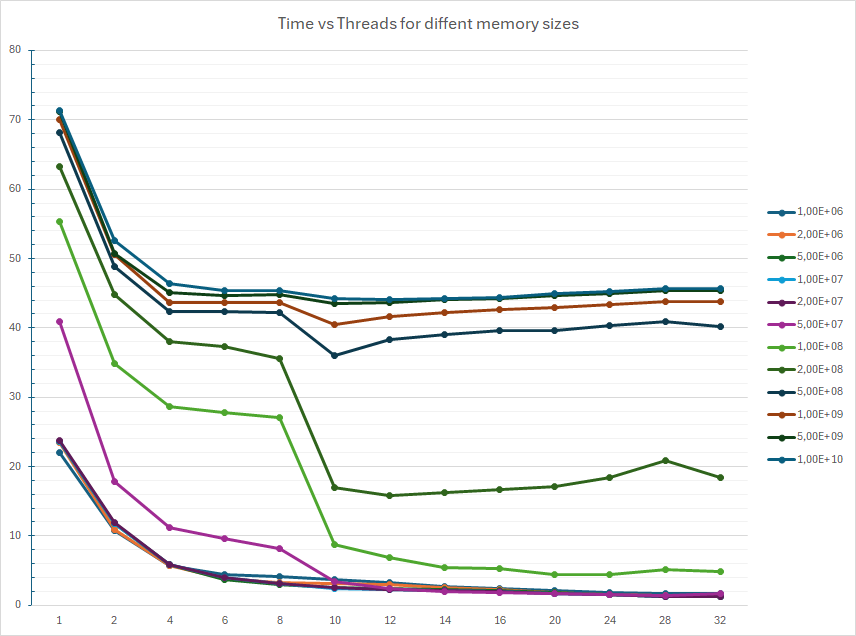
The best result I obtained was about 1.2 s, running on 32 threads, allowing the program to use 106 bytes of RAM, about 1 MiB. In general, for the same number of threads, the less memory -> the faster execution. And for the same amount of memory, once we get below 108 bytes, the more threads -> the faster execution, as we were looking for.
The graph confirms that when allowing using a lot of RAM and thus larger sieves, the execution time levels out at about 10 threads, but when the allowed memory is small, and thus the sieves are smaller, there is actually a gain for every added thread/core used in parallel, all the way up to all 32.
My guess is that this “something” are the caches3 of memory that connects the CPU with the mounted physical RAM. RAM is relatively slow compared to the speed of the CPU, so the CPU has to wait when reading or writing data to RAM. Modern CPU designs include several layers of caches closer to the core of the CPU that are working ever faster then the mounted RAM. The hardware will read chunks of data from RAM into the faster caches in the hope that the chunk will contain both the data needed right now and some data it will need in the next moment, thus saving a cycle on the RAM bus. Data can also be updated in the caches. With a bit of luck (or software design), data will be available in the caches for a longer part of the algorithm, allowing it to run faster. The saving in data fetch time from caches instead of from RAM for small chunks, outweighs the overhead from having many small chunks. Again the term locality is used to describe the desired characteristics of handling data – don’t move too far away from what your program last did.
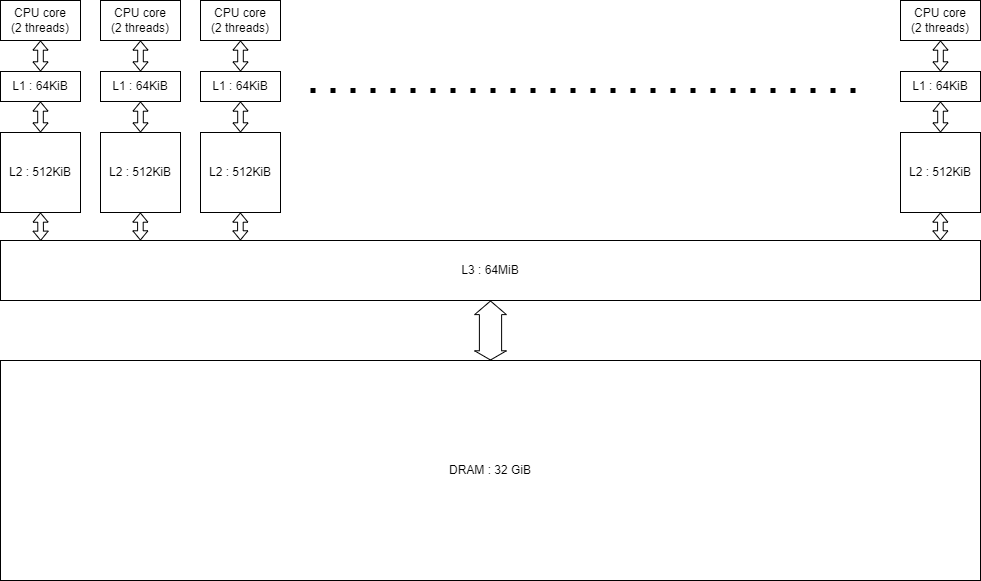
The following diagram illustrates the setup of my computer, using the AMD Ryzen 9 5950X CPU. It has 16 physical cores, each capable of running 2 threads. This is what is called hyperthreading. Each core has 64KiB of Level 1 cache, closest to the core. Each L1 cache connects to a Level 2 cache with 512 KiB for each core. All L2 caches connect to the Level 3 cache with at total size of 64 MiB, which is shared by all of them. The L3 cache finally connects to the mounted physical DRAM of 32 GiB.
To make further investigations on the effect of the size of the small sieves I add another command line parameter, to have better control of that size. In the previous setup, using the parameter –memory, the number of threads determined the size of the sieves. I add
“–range” to control the maximum range of each sieve.
I then ran the program with a combination of different thread numbers and different range sizes and got these results, when plotting the time against the size of the sieves for different numbers of threads:
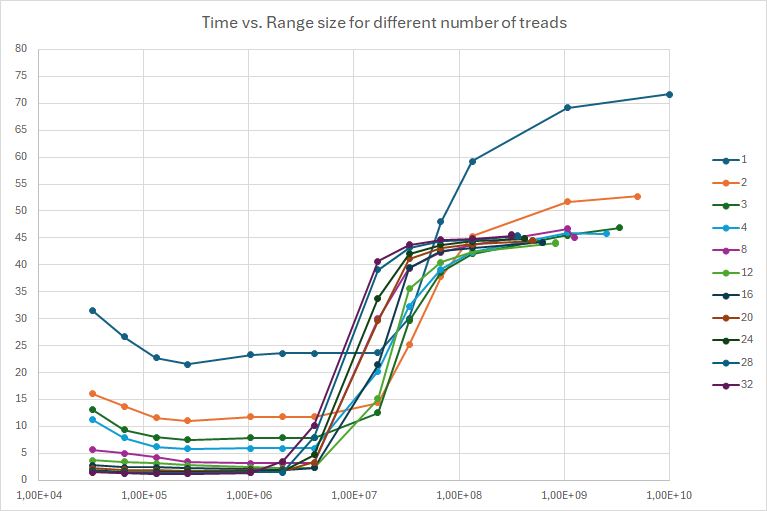
The x-axis of this graph is the size of the small sieves on a logarithmic scale, as I am going from 16 KiB to 20 MiB, doubling up for each step (more or less, I am missing 512 KiB and for the higher values I only took a few).
This obviously shows that small is good – big is bad. We get the best times when the small sieves are close to the size of the L3 and L2 caches, in the area from 128KiB 1 MiB.
Here is the graph, when times are plotted against the number of threads for different range sizes:
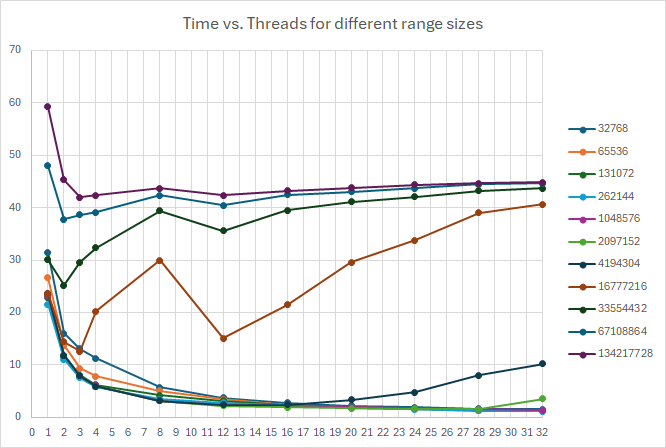
For large range sizes we see the same undesired behavior when we let the sieves be as large as possible within the free physical RAM – no improvement from 8 threads and up. But for small sieves, we have improvement when we add more threads all the way up to 32. This can be seen from the shape of the curve, it looks much like the hyperbolic function 1/x, which is a good sign when making parallel algorithms.
As I stated, each core has its own L2 and L1 cache, which it doesn’t have to share with the other cores. This makes the setup much more as if we had separate computers with their own memory, when we are keeping things small so they can stay in the cache, and the result is actual improvement when adding more threads.
I would like to zoom in on the area from 8 threads and up, and from 16 KiB up to 1MiB, as there are a lot of lines on top of each other. I would like to find the sweet spot to count primes for even higher maximum numbers.
Here is a diagram of time vs. the range size, zooming in on the area from 16KiB to 1 MiB range size, for 6 up to 32 threads:
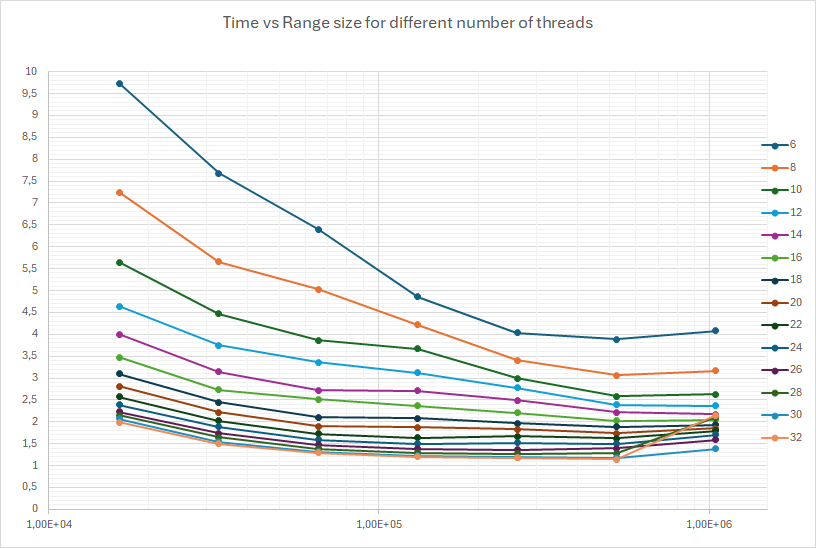
The minimum seem to be in range sizes between 256KiB and 1MiB (the scale is logarithmic).
A graph time vs. number of threads for different ranges looks like this:
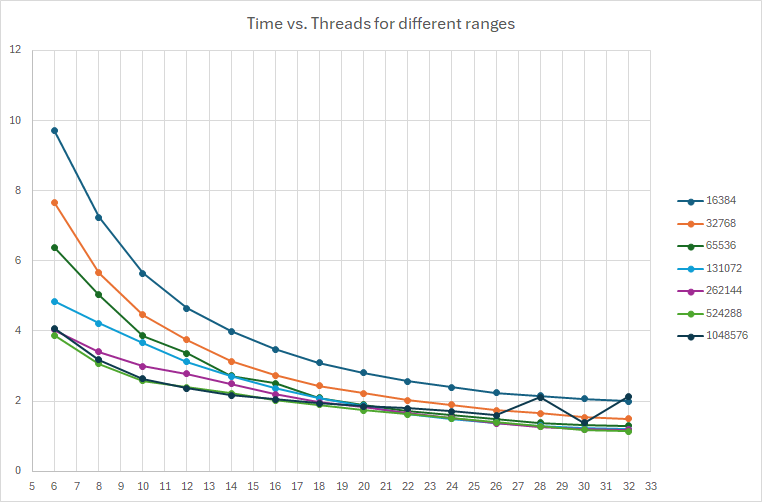
A range of 512KiB seems to be a good choice. The curve shows good behaviour all the way up to 32 threads, whereas the one for 1MiB have some erratic behavior and longer times.
However, a few test runs with a range size of 768 KiB showed better behavior, so that is the number I chose for running with 32 threads, up to a maximum number of 2×10¹³. Here are the runtime results:
| Maximum number | Number of primes | Time | Time |
|---|---|---|---|
| 107 | 664,579 | 0.006 | 0.014 |
| 108 | 5,761,455 | 0.018 | 0.432 |
| 109 | 50,847,534 | 0.119 | 6.064 |
| 1010 | 455,052,511 | 1.157 | 71.801 |
| 1011 | 4,118,054,813 | 11.976 | |
| 1012 | 37,607,912.018 | 128.578 | |
| 1013 | 346,065,536,839 | 1565.22 | |
| 2×10¹³ | 675,895,909,271 | 3424.78 |
The numbers of primes found are correct to this list on Wikipedia.
The times in the rightmost column are the times from my first post, using the naive algorithm with only one thread and a sieve all in one piece.
Where did C++ take us this time?
Besides some fun facts about the Eratosthenes Sieve Algorithm I stumbled on the importance of knowing about the CPU architecture of your computer. Running the same code – more or less – but taking into account the locality of data references by chunking up the sieve in many smaller sieves, the program could take advantage of the many cores. Since each core has its own very fast memory cache, they will each work as a small computer with very fast memory, without interfering with the other cores.
The first visible result was that it was now possible to search through the 1011 lowest numbers to count primes within a very limited time. This number is 100,000,000,000 – 100 billions in American and 100 milliards in European parlance. And it could count the 4,118,054,813 primes, more than 4 billions/milliards primes. Going from more than a night of calculations as seen in the previous blog (I never let it finish), via this new algorithm using a few very large chunks and 1 thread taking 866 s (at the top of this post) down to 12 s using all 32 cores and many small chunks that could stay in the fast L3 cache. In spite of the overhead necessary to execute it that way. This is a factor of about 72, which is more than the factor of 32 expected from the number of cores. Mostly because of a better fit of the algorithm to the architecture of the CPU. Within reasonable computing times the program can go even higher, As seen in the above table, I have tried sifting through the first 2×10¹³ numbers, 20,000,000,000,000 – 20 trillions/billions, which it could do in less than an hour.
This advantage was there right from using just one thread, so maybe you have programs that could benefit from this knowledge, even if you don’t want to orchestrate massive parallelism. In fact, many modern IT-systems are programmed in Java and C#, and those languages have introduced new features to keep relevant data closer, keeping them more local, so that they will be ready in the fast caches when needed. Keeping the server usage low and perhaps the Cloud computing bills down, if you know how to use it.
This kind of changes is not necessary for C++, as it is already working very close to the computer, but you as a programmer have to know about these things, and how to express them in the language using features that are already there!
However, Bjarne Stroustrup is constantly preaching that you shouldn’t try to be smarter than the language and the compiler, but instead base your optimizations on measurements, rather than your intuition. You might get fooled! I have done lots of measuring, as you can see above. But if you really want to investigate the influence of caching on the speed of your program, you need more advanced tools. Both Intel and AMD offer software tools that can report the behavior of your program regarding its cache usage. Since these tools are using features that are highly hardware dependant, each hardware producer have their own tools, and you must get the one matching your CPU or the CPUs of the server cloud you are using.
About the code
As usual the code can be found on github in this repository. Feel free to explore, copy and have fun!
There are probably many ways this program can be optimized. E.g. for each range, the sieve data are allocated from the heap with a new statement and released with a delete statement. With small ranges this will take place many million times, but there are only as many ranges active as there a threads, in this case 32, so a scheme to handle a pool of preallocated arrays could give a saving. But experiment and measure first! I would probably do this on a git branch, to keep the current solution working.
The Microsoft Concurrency Runtime is automatically included in the installation of the Microsoft C++ compiler. See the footnote below about its future.
I continued to use the command line parameter parser from Matthias S. Benkmann which can be found here.
The timing data were logged in files in csv format and subsequently imported into Excel to make the graphs seen in this post. It is a big hazzle to navigate between number formats, Northern European based cultures using the comma ‘,’ as decimal separator, English based using the period ‘.’. The file were therefore in semicolon ‘;’ separated values format. Causing all kinds of problems working in Excel. (I live in Denmark).
- The Microsoft Concurrency Runtime is a proprierary library, based on another proprietary one from Intel, the Threading Building Blocks library. The Microsoft version is not portable, it is only available as a compiled library for MSVC. Fortunately, the concepts of these two libraries have ended up in an Open Source product, the oneAPI Threading Building Blocks, baptized oneTBB for short. In the future I may come back to this, to try out my C++ programs with different compilers, on different OS’es, and on different hardware! ↩︎
- For the usage of powers of 10 and of 2, and MB, MiB, GB, and GiB, etc, see this Wikipedia explanation of the abbreviations. ↩︎
- Read about CPU caches here. ↩︎

Leave a Reply